
Create Post
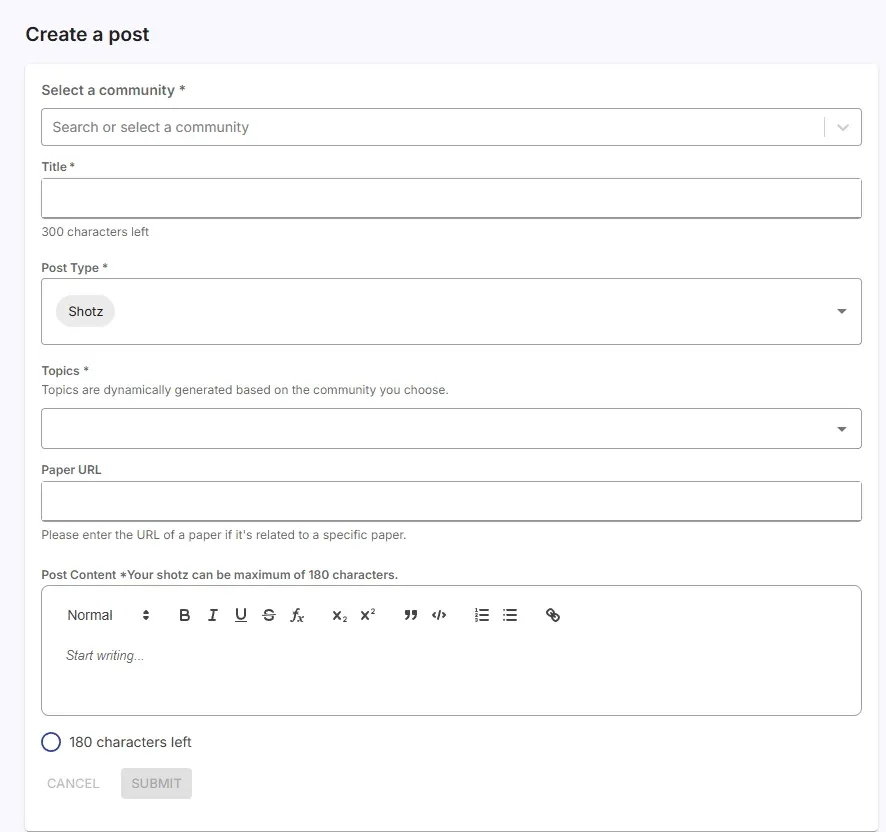
😫 Before: “I Need to Ask Something… But Where?”
Section titled “😫 Before: “I Need to Ask Something… But Where?””If you’ve ever searched “ask research questions online,”
“research community for academics,”
or “how to get help with research problems,”
you already know how frustrating it is to not have a dedicated space for academic conversations.
Most platforms aren’t made for serious research.
You deserve a place where your academic questions actually belong.
🔄 Shift: EurekAI Forum Gives You a Focused Space to Ask, Share & Discuss
Section titled “🔄 Shift: EurekAI Forum Gives You a Focused Space to Ask, Share & Discuss”Posting in a community means:
- 🎓 Your question reaches the right people
- 🤝 Peers working in your domain actually respond
- 📚 Discussions stay organized and searchable
- 🔄 You contribute to a growing academic network
Your post becomes part of a living knowledge base.
🌤️ After: Your Questions & Insights Find Their People
Section titled “🌤️ After: Your Questions & Insights Find Their People”Whether you’re sharing:
- a research doubt
- a concept clarification
- a reading insight
- a reproducibility issue
- a thought triggered by a paper
…your post helps someone else—and their post helps you.
This is how real academic collaboration happens.
💛 Empowerment: Your Voice Shapes EurekAI’s Research Ecosystem
Section titled “💛 Empowerment: Your Voice Shapes EurekAI’s Research Ecosystem”- 💬 Every post you write strengthens the forum.
- ❓ Every question you ask helps future researchers.
- 🌍 Every insight you share becomes part of a community’s learning.
- 🔗 Every paper link you include makes the forum more useful.
You’re not just posting. You’re contributing to a space built by researchers, for researchers. 🌱💙
🧭 Select a Community
Section titled “🧭 Select a Community”- Choose a community from the Select a community dropdown.
- All communities you’ve joined will automatically appear here.
- Use the search bar to quickly find your community.
📝 Title
Section titled “📝 Title”- Write a clear, concise title that reflects your question or topic.
- A good title helps members understand your post at a glance.
🧩 Post Type
Section titled “🧩 Post Type”You can choose between two types of posts:
-
⚡ Shotz:
A short-form post (up to 180 characters).
Great for quick updates, small questions, or bite-sized insights. -
📝 Posts:
Long-form discussions for deeper thoughts, research problems, findings, or detailed questions.
🏷️ Topics
Section titled “🏷️ Topics”- Add relevant topics to categorize your post.
- This improves visibility, searchability, and discoverability for others in your field.
🔗 Paper URL (Optional)
Section titled “🔗 Paper URL (Optional)”- Add a research paper URL if your post references a specific paper.
- This lets community members access the paper immediately.
✍️ Post Content
Section titled “✍️ Post Content”- Write the main content of your post in the text editor.
- Be clear, be thoughtful, and provide context when needed.
When everything looks good, click Submit to publish your post inside the selected community.